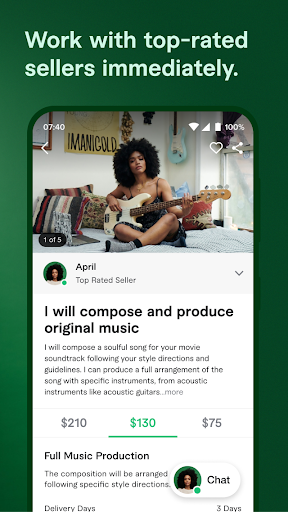
Fiverr Mobile is a simple and powerful app that brings freelance services right to your phone. Whether you want to hire a freelancer or offer your own skills, Fiverr Mobile makes the process fast and easy. You can search for services, send messages, and track orders all from your device.
Because everything is in one place, managing projects becomes more flexible and convenient. With Fiverr Mobile, you stay connected to global talent anytime, anywhere, and get work done with just a few taps.
Uses of the Fiverr Mobile App
Fiverr Mobile is a helpful app for both buyers and freelancers. It makes finding services and managing work simple and fast. With many useful features, Fiverr Mobile helps users stay productive while on the go. Below are the main ways you can use the app.
1Hire freelancers for any task
With Fiverr Mobile, you can quickly find skilled freelancers for many jobs. You can browse services in areas like writing, design, or programming. The app lets you compare offers, check reviews, and choose the best option for your needs. Since everything happens on your phone, hiring becomes easy and fast.
2Offer your freelance services
Fiverr Mobile is not only for hiring—it is also perfect for freelancers offering services. You can set up your profile, list your gigs, and reply to client messages. Because the app keeps you updated, you never miss a chance to grow your business or accept new projects.
3Track your orders and deliveries
The Fiverr Mobile app helps you stay on top of all your orders. You can check the progress of each task, get delivery alerts, and know when something is done. These updates keep your projects moving smoothly and reduce delays or confusion.
4Communicate with clients or sellers
One important use of Fiverr Mobile is its messaging system. You can talk directly with buyers or freelancers, ask questions, or give updates. Good communication helps make sure everyone understands the job, and the app makes that easy at any time.
5Manage your account from anywhere
Fiverr Mobile gives full control over your account from your device. You can update your profile, change settings, or view earnings. This way, even when you're away from your computer, you still manage your freelance work or orders without delay.
6Receive notifications and stay updated
The Fiverr Mobile app sends alerts for new messages, orders, and deadlines. With these timely updates, you can act fast and avoid missing important tasks. This helps you stay organized and focused throughout your freelance journey.
Summary
Fiverr Mobile has many useful features for hiring, selling, and managing freelance services. It helps you work from anywhere and stay in control. Whether you're a buyer or a freelancer, the app makes your tasks easier with simple tools and clear updates. The Fiverr Mobile app is the best way to handle your freelance work while on the move.
Fiverr Mobile App: Freelance Services in Your Pocket!
Fiverr Mobile gives you quick and easy access to a global network of freelance professionals. Whether you're a business owner, entrepreneur, or skilled freelancer, the Fiverr Mobile app provides a powerful platform to connect, collaborate, and succeed. With simple tools, clear communication features, and secure transactions, managing freelance projects has never been this convenient. Let’s explore what makes Fiverr Mobile the go-to choice for millions.
1Explore a wide range of freelance services
Fiverr Mobile gives you access to thousands of services across many fields. From graphic design and content writing to web development and voice-over, there’s a service for every need. Each category is filled with skilled freelancers ready to deliver quality work at any time.
2Find the right freelancer easily
With Fiverr Mobile, searching for the right expert is simple. You can filter results by category, price, delivery time, and seller ratings. Plus, reading past client reviews helps you choose the best freelancer with confidence and clarity.
3Enjoy safe and smooth transactions
Using Fiverr Mobile ensures your payments are always secure. The app has built-in protection, keeping your money safe until the work is completed. Fiverr also helps resolve disputes fairly, ensuring both buyers and sellers feel protected throughout the process.
4Create custom packages that fit your needs
Flexibility is a big part of Fiverr Mobile. You can work with freelancers to create personalized service packages that meet your exact requirements. Whether it's a single task or long-term project, the app lets you manage everything smoothly.
5Stay connected with in-app communication
Fiverr Mobile includes built-in messaging tools for real-time communication. You can send messages, share files, and get updates instantly. With project tracking and progress alerts, you always stay in control of your work.
6Access your freelance projects from anywhere
With Fiverr Mobile, your freelance world fits in your pocket. Whether you’re traveling, commuting, or working from home, the app lets you monitor orders, reply to messages, and manage tasks easily from your smartphone or tablet.
Summary
Fiverr Mobile makes it easy to hire freelancers or offer your services on the go. The app brings together tools, secure payments, and a wide range of categories to help you get professional results. Whether you're starting a new business, finishing a project, or selling your skills, Fiverr Mobile keeps everything at your fingertips. Download Fiverr Mobile today and discover the easiest way to connect with global talent anytime, anywhere.
Recommended
Parking Kitty app: Smart Way to Park in Portland
Fiverr Mobile App: Overview
Fiverr Mobile is a helpful app that connects users with freelance services around the world. It allows people to hire freelancers or sell their skills with ease. With its easy design and fast performance, Fiverr Mobile makes working on the go simple. Whether you need design work, writing help, or tech support, this app brings all freelance services to your pocket.
Features
Fiverr Mobile offers service search, profile setup, order tracking, real-time messaging, secure payments, and personalized gig options for every user.
Performance
The app runs smoothly with fast loading times and quick updates. It rarely crashes, and most users enjoy stable performance on any device.
Design & User Interface
Fiverr Mobile has a clean and user-friendly layout. It is easy to navigate, and all features are clearly marked for simple access.
Pros and Cons
Fiverr Mobile is easy to use, with fast communication and flexible services. However, high demand may delay responses, and some gigs vary in quality.
Pricing
Fiverr Mobile is free to download. Service prices depend on the freelancer’s rate, and Fiverr takes a small fee from each transaction.
Summary
Fiverr Mobile is a useful app for managing freelance services from your phone. It offers simple tools, smooth performance, and wide access to global talent.
Features of the Fiverr Mobile App
Fiverr Mobile offers many useful features that make it easy to find services, manage tasks, and communicate with freelancers. The app is designed to support both buyers and sellers in a simple and organized way. Below are the key features that help users get the most out of Fiverr Mobile.
Search and explore freelance services
Fiverr Mobile lets you search through a wide range of services in many categories. You can explore areas like graphic design, writing, marketing, tech, and more. With filters for price, delivery time, and ratings, it becomes easy to find the right freelancer for your task.
Set up and manage your profile
Freelancers can use Fiverr Mobile to create and update their profiles with just a few steps. You can add your skills, list your services, and share past work. This helps you get noticed by buyers looking for your specific talents.
Place and track orders easily
Using Fiverr Mobile, you can place new orders and track their progress anytime. The app shows you updates on your orders, making it easier to stay informed. This way, you always know the status of your projects and when they will be completed.
Communicate quickly and clearly
Fiverr Mobile has a built-in chat tool that lets buyers and freelancers talk directly. You can ask questions, give feedback, and share files. Clear and quick communication helps avoid confusion and ensures the work is done correctly.
Customize services to meet your needs
The app allows buyers and sellers to create custom offers that match special requests. You can discuss details and agree on a price, delivery time, and work plan. Fiverr Mobile gives you the freedom to shape each project the way you want.
Manage tasks from any location
With Fiverr Mobile, you are not tied to a desk. You can manage everything from your phone, whether at home or on the move. The app works well on most devices, helping you stay productive no matter where you are.
Summary
Fiverr Mobile comes with helpful features like easy search, profile setup, real-time messaging, and task tracking. These tools make freelance work simple and flexible. Whether you’re hiring or offering services, Fiverr Mobile keeps everything in one place, helping you work better from anywhere.
Fiverr Mobile App Performance
Fiverr Mobile is designed to perform well on most smartphones and tablets. It helps users handle freelance tasks quickly and smoothly. The app focuses on speed, stability, and ease of use, making it a great tool for both freelancers and clients.
Fast loading and quick access
Fiverr Mobile opens quickly and loads pages without long delays. You can browse services, view orders, and send messages in just seconds. Because everything loads fast, you can complete tasks quickly and save valuable time while working from anywhere.
Smooth navigation between features
The app allows smooth movement from one section to another. You can search for freelancers, read reviews, and check your orders without confusion. This flow makes Fiverr Mobile easy to use even for those who are not tech-savvy.
Reliable performance across devices
Fiverr Mobile works well on different phones and tablets, whether old or new. It is regularly updated, which helps fix bugs and improve speed. As a result, users enjoy a stable experience while using Fiverr Mobile throughout the day.
Real-time updates and alerts
With Fiverr Mobile, you receive real-time alerts about new messages, order changes, or delivery updates. These notifications help you respond quickly and keep your projects running on time. Since everything updates in real-time, you never miss important changes.
Consistent performance during high usage
Even when many users are online, Fiverr Mobile continues to work smoothly. It rarely crashes or freezes, which is helpful during busy work periods. This means you can trust the app to work when you need it most.
Summary
Fiverr Mobile offers fast, stable, and smooth performance across all devices. With quick loading times and real-time alerts, it helps you stay on track. The app’s strong performance ensures you can manage freelance tasks without delays or technical problems.
Fiverr Mobile App Design & User Interface
The Fiverr Mobile app is made for users who want a simple and smooth experience. Its design focuses on easy access, clear navigation, and helpful features that work well on any phone. With this setup, users can quickly find what they need and stay focused on their projects.
Simple layout and clean design
Fiverr Mobile has a clean layout that avoids clutter and confusion. Everything is placed where users expect it to be. Because of this, even first-time users can explore the app without any trouble. The clean design also helps improve focus by removing distractions.
Easy navigation between features
Moving from one feature to another is quick and simple with Fiverr Mobile. The bottom menu includes tabs for home, search, messages, orders, and profile. Each section loads fast and clearly shows what you can do next. This makes the app easy to use for both buyers and freelancers.
Helpful icons and readable text
Fiverr Mobile uses clear icons and readable text to guide users. Each icon shows its purpose well, so you don’t get lost. The font is large enough to read without effort, which is helpful when working on your phone in different places or lighting.
Smooth experience on all screen sizes
Fiverr Mobile works well on many devices, whether you're using a small phone or a large tablet. The app adjusts to your screen size and keeps everything organized. This responsive design makes sure users always have a good experience no matter what device they use.
Summary
Fiverr Mobile has a user-friendly design that makes working with freelance services much easier. The clean layout, simple icons, and smooth navigation help users finish tasks without stress. Whether you're hiring or selling, Fiverr Mobile ensures that using the app always feels fast and comfortable.
Pros and Cons of the Fiverr Mobile App
The Fiverr Mobile app offers many useful tools for freelancers and buyers, but like any app, it also has some limits. Below are the main advantages and a few downsides of using Fiverr Mobile, explained in simple words to help users understand its real value.
Pros of the Fiverr Mobile App
- Easy to use
- Fiverr Mobile has a clean layout that makes it simple to search, hire, or manage your freelance work from anywhere.
- Saves time
- With Fiverr Mobile, you can quickly browse services, send messages, and track progress without using a computer or waiting long.
- Work from anywhere
The app lets you stay connected with clients or freelancers while you travel, work from home, or move between meetings. - Secure payments
Fiverr Mobile ensures all transactions are safe. You only pay when the work is done, giving you peace of mind every time. - Real-time updates
You get quick alerts for new messages, order status, and deadlines. This helps you act fast and avoid missing important tasks.
Cons of the Fiverr Mobile App
- Smaller screen space
Working on Fiverr Mobile may feel limited on a small screen. It can be harder to view large files or compare services. - Sometimes slow loading
While rare, Fiverr Mobile may load slowly during peak hours or if the internet connection is weak or unstable. - Hard to multitask
The app allows only one screen at a time. So, switching between gigs, chats, or settings may take extra effort. - Limited editing tools
Some profile or gig settings are easier to edit on the desktop version. Fiverr Mobile lacks a few advanced options. - Too many notifications
Fiverr Mobile sends many alerts. While helpful, they can be distracting if not managed properly through your settings.
Summary
Fiverr Mobile is a powerful app that helps users manage freelance work easily. It offers strong tools, smooth payments, and global access. Although there are a few small issues like screen size and editing limits, the app still brings great value. With Fiverr Mobile, you can stay active in the freelance world wherever you go.
Fiverr Mobile App Pricing
Fiverr Mobile makes it easy to manage freelance work, and understanding its pricing system is very important. The app is free to download, but service costs depend on what you need. Both buyers and sellers should know how Fiverr Mobile handles fees and payments. Below are the main pricing details explained in simple terms.
Free to download and install
Fiverr Mobile is completely free to download from the app store. There are no charges to install it or to create an account. Anyone can start using the app right away, whether you want to buy services or sell your skills.
Service pricing varies by freelancer
Each freelancer on Fiverr Mobile sets their own prices. You can find basic services starting as low as $5. However, prices can go higher depending on the complexity, delivery time, and experience of the seller. Many gigs also offer tiered packages, giving buyers more options to choose from.
Fiverr’s service fee for buyers
When you place an order using Fiverr Mobile, a small service fee is added. For most orders under $40, the fee is around $2. For orders above that amount, Fiverr charges 5% of the total price. This fee helps Fiverr maintain the platform and provide customer support.
Fiverr’s commission from sellers
Sellers on Fiverr Mobile pay a commission to Fiverr from each order they complete. Fiverr takes 20% of the seller’s earnings as a service fee. For example, if a seller earns $100, they receive $80, and Fiverr keeps $20. This fee supports platform features like dispute resolution and secure payments.
No monthly or hidden charges
Fiverr Mobile does not have any monthly fees or hidden costs. You only pay when you buy or sell a service. Because the pricing is clear and upfront, users can budget properly and avoid surprises while using the app.
Summary
Fiverr Mobile is free to use, with clear pricing for both buyers and sellers. You only pay for services you order, and the app charges a small fee to keep everything running smoothly. With no hidden costs or monthly charges, Fiverr Mobile offers flexible pricing that fits every budget.
You may learn about
Park ATX app: Fast, Secure Way to Park in Austin
How to Download & Use Fiverr Mobile App
Fiverr Mobile is a simple app that helps you hire freelancers or offer your skills from anywhere. It’s easy to set up and use. Below is a step-by-step guide on how to download and use Fiverr Mobile to get the most out of your freelance work.
Download the app from your store
To get started, go to the Google Play Store or Apple App Store. Search for Fiverr Mobile and tap the install button. After downloading, the app will appear on your phone’s home screen. Make sure your internet connection is stable to avoid any delays during the download.
Create or log into your account
Open Fiverr Mobile and sign up using your email or a social account. If you already have an account, just log in. The app will guide you through each step, and your account will be ready to use in minutes.
Set up your profile
Once logged in, go to your profile section and add your name, photo, and a short description. This helps others know more about you. If you’re offering services, you can list your skills and work samples. Clear profiles help build trust and attract more buyers.
Search for services or post your gig
Fiverr Mobile allows you to explore different services in design, writing, tech, and more. Use the search bar to find what you need. If you’re a freelancer, tap “Become a Seller” to list your services. Add a title, description, price, and delivery time for your gig.
Communicate with freelancers or buyers
You can chat directly using Fiverr Mobile’s built-in messaging feature. Ask questions, share ideas, or send updates anytime. The app keeps all chats in one place, so you can easily follow up on each project.
Manage orders and deliveries
Fiverr Mobile shows all your orders in one dashboard. You can check status, view deadlines, and track deliveries. If you’re a seller, upload finished work when done. If you’re a buyer, review the delivery and accept it or ask for changes.
Use notifications to stay updated
Fiverr Mobile sends alerts for messages, order changes, and important updates. This keeps you informed and helps you respond quickly. You can also adjust notification settings based on your needs.
Summary
Fiverr Mobile is an easy way to manage freelance work from your phone. You can download the app, set up your account, and start hiring or selling quickly. With useful tools like messaging, order tracking, and alerts, Fiverr Mobile helps you stay organized and connected wherever you are.
Some questions people ask about the Fiverr Mobile app
Does Fiverr have a mobile app?
Yes, Fiverr has a mobile app called Fiverr Mobile. It is available for both Android and iOS users. With Fiverr Mobile, you can search services, message freelancers, and manage projects on the go. It helps users stay connected and complete freelance tasks anytime, anywhere from their phone.
How to use Fiverr on mobile phone?
To use Fiverr on a mobile phone, download the Fiverr Mobile app from the Play Store or App Store. After installing, create or log into your account. Then, search for services or list your own. You can manage orders, send messages, and track projects easily within the app.
How much does it cost to develop an app on Fiverr?
The cost to develop an app on Fiverr depends on the freelancer and your project needs. Prices usually start at $100 and can go much higher. Fiverr Mobile helps you compare offers, view reviews, and choose a developer who matches your goals and budget.
Can I earn from Fiverr app?
Yes, you can earn money using Fiverr Mobile. As a freelancer, you can offer your services, complete tasks, and get paid directly through the app. Fiverr Mobile lets you stay connected with buyers, respond quickly to messages, and manage all your gigs from one place.
Does Fiverr charge a monthly fee?
No, Fiverr does not charge a monthly fee to use its platform. Fiverr Mobile is free to download and use. However, Fiverr takes a service fee from each completed order. So, while using the app has no monthly cost, part of your earnings goes to Fiverr.
Does Fiverr pay real money?
Yes, Fiverr pays real money for completed work. When you use Fiverr Mobile, your earnings are sent to your account after order completion. You can withdraw funds through PayPal, Payoneer, or bank transfer. Fiverr ensures freelancers receive real payments for their services after each successful job.
Is Upwork or Fiverr better?
Upwork and Fiverr both offer freelance services, but they work differently. Fiverr Mobile is best for quick gigs and lower-cost tasks. Upwork suits long-term or hourly projects. Your choice depends on your needs. Fiverr Mobile is great for easy browsing and faster orders through your phone.
What is Fiverr withdrawal fee?
Fiverr charges a small withdrawal fee based on the method you choose. If you withdraw through PayPal or Payoneer, the fee is low or sometimes free. Fiverr Mobile allows you to track your earnings and choose your preferred payment method easily for each withdrawal.
How to withdraw money from Fiverr?
To withdraw money from Fiverr, go to your earnings tab on Fiverr Mobile. Choose a payment method such as PayPal or Payoneer. Follow the instructions to confirm your transfer. Withdrawals may take a few hours or days based on the payment method you select.
Why Fiverr charges so high?
Fiverr charges a service fee to help run the platform and provide tools for buyers and freelancers. Fiverr Mobile includes secure payments, support, and project tracking. The fee supports these services. Though the charge may seem high, it helps keep the system safe and organized.
What is Fiverr app used for?
Fiverr Mobile is used to hire freelancers or sell services across many fields. You can browse gigs, manage orders, and chat with clients. It helps both buyers and sellers stay active in freelance work. Fiverr Mobile is perfect for working remotely and staying updated on projects.
How do I earn money in Fiverr?
To earn money on Fiverr, create an account and set up a seller profile. List your services, known as gigs, with clear prices and delivery times. With Fiverr Mobile, you can respond to orders quickly, deliver work on time, and grow your earnings from anywhere.
How to start working on Fiverr?
Start working on Fiverr by signing up, creating a seller profile, and posting your gigs. Choose services you’re good at and set fair prices. Fiverr Mobile helps you manage orders and messages so you can build your freelance business from your phone.
Is Fiverr a legit app?
Yes, Fiverr is a legit app trusted by millions around the world. Fiverr Mobile is secure and provides tools for safe payments and project tracking. With proper use, both buyers and freelancers can complete projects and receive payments with peace of mind.
Is Fiverr 100% safe?
Fiverr is mostly safe, and Fiverr Mobile includes added features like payment protection and secure messaging. However, users should always review profiles, check ratings, and follow platform rules. Staying alert while using Fiverr Mobile helps avoid scams and ensures a better experience.
Is Fiverr fake or not?
Fiverr is not fake. It is a real and trusted platform for freelance services. Fiverr Mobile helps you work easily from anywhere. By checking reviews and being careful with orders, users can avoid problems and enjoy safe and successful freelance experiences.
Is Fiverr free or paid?
Fiverr Mobile is free to download and use. You can browse gigs or list your services without paying a fee. Fiverr only charges when a transaction happens. This means both buyers and freelancers can use the platform without monthly or signup payments.
Is my money safe in Fiverr?
Yes, your money is safe in Fiverr. When you use Fiverr Mobile, payments are held securely until the job is done. This protects both buyers and freelancers. Fiverr only releases funds after confirmation, so users can feel safe during each step of the process.
How does Fiverr pay?
Fiverr pays freelancers through several methods, including PayPal, Payoneer, and bank transfer. With Fiverr Mobile, you can check your balance, select a payment method, and withdraw earnings. Payments are usually processed after the order is marked as complete and the buyer gives approval.
How to withdraw money from Fiverr in Bangladesh?
To withdraw money in Bangladesh, use Fiverr Mobile to connect your Payoneer account. Go to the earnings section, select Payoneer, and confirm your details. Once linked, you can easily transfer your Fiverr earnings to your local bank account. Transfers may take 1–2 days to complete.
What are Fiverr fees?
Fiverr charges a 20% fee on each completed order. So, if you earn $100, you receive $80. Fiverr Mobile helps track your earnings and shows clear breakdowns of what you earn and what fee is taken. Buyers also pay a small fee when placing orders.
How do I download and install the Fiverr app?
To download Fiverr Mobile, go to the Google Play Store or Apple App Store. Search for “Fiverr Mobile,” then tap “Install.” The app will download in a few seconds. Once installed, you can open it from your home screen. Make sure your internet is stable to avoid delays during the download and installation process.
How do I create an account or log in?
After opening Fiverr Mobile, you will see options to sign up or log in. You can use your email, Google, Facebook, or Apple account to register. If you already have an account, just enter your login details. The process is quick, and you can start exploring or offering services right away.
How do I find a gig or service on the app?
Fiverr Mobile makes it easy to search for services. Use the search bar at the top and type keywords like “logo design” or “content writing.” You can filter results by category, budget, delivery time, or seller rating. This helps you find the best gig for your needs without any confusion.
How do I order a gig?
To order a service on Fiverr Mobile, first open a gig you like. Then, choose a package that fits your needs. Tap “Continue” and follow the steps to complete your order. You may need to provide project details. Once done, the freelancer will begin working, and you’ll get updates in the app.
How do I communicate with sellers/buyers through the app?
Fiverr Mobile has built-in messaging that helps you talk directly with buyers or sellers. You can ask questions, send files, or discuss project details. This tool makes communication quick and smooth, helping both sides stay informed. You also get alerts when someone replies, so you never miss an important message.
How can I track the progress of an order?
Fiverr Mobile allows you to view the status of all your orders in one place. Go to the “Orders” section to see timelines, delivery updates, and progress. If you're a buyer, you can check if work is being delivered. If you're a seller, you can upload files or mark tasks as complete.
How do I approve or request revisions on an order?
Once a seller delivers your work, Fiverr Mobile will alert you. Open the order and review the file. If everything looks good, tap to approve. If you need changes, request a revision with your comments. This step ensures your needs are met before you release the final payment to the seller.
How do I leave a review or rating?
After the order is complete, Fiverr Mobile lets you rate the seller. You’ll be asked to give a star rating and write a short review. Sharing your experience helps other users choose better gigs. Also, it gives feedback to the seller, which can improve their future service.
How do I manage my earnings/payments on the app (for sellers)?
Sellers can view earnings directly from Fiverr Mobile. Tap on “Earnings” to see your balance, pending payments, and withdrawals. The app updates in real-time, showing exactly what you’ve earned. You can also track how long each payment takes to clear before it becomes available for withdrawal.
How do I withdraw my earnings (for sellers)?
In Fiverr Mobile, go to the “Earnings” section and tap “Withdraw.” You’ll see options like bank transfer, PayPal, or Fiverr Revenue Card. Choose the method you prefer and follow the steps. Make sure your payment method is set up before withdrawing. Fiverr may take a short time to process the funds.
How do I manage my payment methods (for buyers)?
Fiverr Mobile makes it easy to update your payment details. Go to settings and open the payment section. You can add or remove cards, link a PayPal account, or manage billing info. This helps you keep everything up-to-date, making future orders smooth and hassle-free.
Can I create or edit my gig on the app (for sellers)?
Yes, sellers can create and edit gigs using Fiverr Mobile. Tap on your profile, then choose “Gigs.” You can edit titles, descriptions, prices, and delivery times. It’s a great way to update services while on the go. However, for advanced edits, the desktop version may offer more tools.
How do I manage my availability or "away" status (for sellers)?
With Fiverr Mobile, sellers can set their availability. Go to your profile and tap on the availability settings. You can switch to “Unavailable” if you’re on a break. This helps buyers know when you’re not accepting orders. You can also set an auto-reply to let them know you’ll be back soon.
How do I get customer support through the app?
If you need help, Fiverr Mobile has a support section. Tap on “Help & Support” in the settings. You’ll find common questions and live chat support. You can also submit a request if you need specific help. The support team usually replies within a short time, making problem-solving fast.
What should I do if the app is crashing or freezing?
If Fiverr Mobile crashes or freezes, try restarting the app or device. Make sure the app is updated to the latest version. Clear cache from your phone’s settings. If the issue continues, uninstall and reinstall the app. For more help, use the support section to contact Fiverr’s customer service.
How do I get notifications for new messages or orders?
Fiverr Mobile sends notifications for messages, orders, and deadlines. Make sure notifications are turned on in both the app and your phone settings. These alerts help you stay updated and reply quickly. You can adjust which notifications you receive so that you only get what’s important.
Is the Fiverr app secure for transactions and personal data?
Yes, Fiverr Mobile is secure. All payments are processed with encryption, and your data is protected. The app also uses two-factor authentication for extra safety. Fiverr does not share your personal info without permission, and its system is regularly updated to prevent risks and protect user accounts.
Can I use the app to manage my profile and settings?
Fiverr Mobile allows you to manage your profile anytime. You can change your photo, description, and other personal details. You can also adjust settings like language, notifications, and privacy options. This helps you keep your account active and updated, even when you’re not near a computer.
How do I send custom offers to buyers (for sellers)?
Sellers can send custom offers using Fiverr Mobile. Open a chat with a buyer and tap “Create Offer.” Enter the service details, delivery time, and price. This feature helps you offer special solutions based on the buyer’s needs. It’s a flexible way to win more orders.
Can I view analytics or performance reports on the app (for sellers)?
Yes, Fiverr Mobile gives sellers access to analytics. Go to the “Analytics” tab to view impressions, clicks, and orders. This helps you track performance and see which gigs are doing well. You can also check buyer feedback and improve your services based on those insights.
You may like
ParkHouston App: Reserve & Pay for Parking in Houston
Hire Freelancers Anytime, Anywhere with the Fiverr Mobile App!
Fiverr Mobile gives you the freedom to hire skilled freelancers anytime and from anywhere. Whether you need help with writing, design, tech, or marketing, Fiverr Mobile makes the whole process fast and easy. You can search for services, place orders, and chat with sellers from your phone.
The app helps you stay connected with your project, even when you're away from your desk. Since it includes secure payments and real-time alerts, you never miss an update. With Fiverr Mobile, managing freelance work becomes more simple, flexible, and stress-free. Download Fiverr Mobile today and start working smarter, not harder.