The GA Parking app is designed to make parking easier and more convenient. With just a few taps, you can find, reserve, and pay for parking spaces.
This app helps you avoid the stress of searching for parking and ensures you always have a spot waiting for you. With the GA Parking app, you can secure your parking and enjoy a smooth day ahead.
Usage of GA Parking App
The GA Parking app is a simple and convenient tool to manage your parking needs. Once you download the app, you can quickly find available parking spots near your location. The app uses GPS to help you locate spaces in real-time, making it easier to park wherever you are.
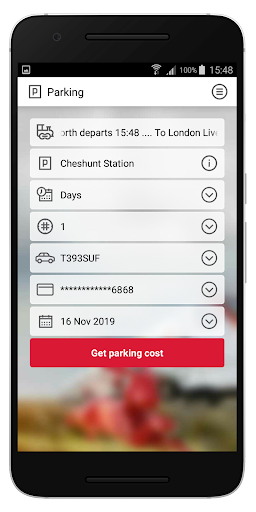
After selecting a spot, you can reserve your space in advance to guarantee a parking spot when you arrive. GA Parking allows you to pay for your parking directly through the app. This means you can avoid cash payments or parking meters, making the process more efficient.
Additionally, the GA Parking app automatically calculates your parking fee based on how long you park, ensuring accurate payments. You can also extend your parking session through the app if needed, giving you added flexibility.
Overall, GA Parking simplifies parking by allowing you to find, reserve, and pay for parking effortlessly. It makes parking stress-free and more manageable, ensuring you always have a spot when you need it.
GA Parking App: Unleash Simple, Secure Parking!
Say goodbye to the hassle of parking meters and last-minute parking stress with the GA Parking app. This convenient app lets you easily reserve your parking space in advance, ensuring you always have a spot waiting for you. Whether you're commuting daily or parking occasionally, the GA Parking app simplifies your parking experience, allowing you to easily find, reserve, and pay for parking using your smartphone.
The GA Parking app features a user-friendly interface, making it simple for everyone to navigate. With its clean and intuitive design, users can quickly access various features without any confusion. The app ensures that parking-related tasks are completed effortlessly, saving you time and reducing stress.
One of the key features of the GA Parking app is real-time parking payments. With this feature, users can pay instantly for parking without needing physical tickets or cash. The app automatically calculates the parking fee based on the time you've parked and deducts the exact amount. This means you never have to worry about overpaying or underpaying for parking.
The GA Parking app also includes a parking spot finder that uses GPS integration to help you locate available parking spaces near your destination. It provides real-time updates on parking availability, rates, and any restrictions, so you can make informed decisions before you park. This feature is especially useful in busy areas where parking is limited.
For added convenience, GA Parking allows users to reserve parking spots in advance. This ensures that you'll always have a space waiting for you, even in crowded areas. The app also offers the ability to pre-book parking for specific times and dates, giving you even more flexibility and control over your parking needs.
Whether you're a frequent commuter or an occasional driver, the GA Parking app is the perfect solution for managing your parking. It helps you easily find parking spots, reserve spaces in advance, make payments, and even extend parking sessions. With its seamless and convenient features, the GA Parking app ensures that your parking experience is simple, secure, and stress-free. Download the GA Parking app today and experience the ease of smart parking.
GA Parking App: Overview
The GA Parking app offers a range of features to make parking easier. It allows users to find, reserve, and pay for parking spaces through a simple interface. The app performs well, providing real-time parking availability and GPS navigation to help you find nearby spots. Its user-friendly design ensures quick access to features.
While convenient, some users may find limited availability in certain areas. The app is free to download, with pricing based on parking duration and location. Overall, GA Parking is a convenient solution for managing parking needs efficiently.
Recommended
Southend Parking App: Supercharge Your Seaside Parking!
GA Parking App Features
The GA Parking app offers a variety of features designed to make parking easier and more convenient for users. Whether you're commuting or parking for a short time, the app helps you manage your parking needs effortlessly.
Real-Time Parking Availability
One of the standout features of the GA Parking app is its real-time parking availability. The app uses GPS technology to show nearby parking spots, ensuring you can find a space quickly. It provides live updates on available spots, making it easier to navigate crowded areas.
Reserve and Pre-Book Parking
GA Parking allows you to reserve parking spots in advance. This feature is especially useful for busy areas where parking is limited. By booking your spot ahead of time, you ensure a place to park when you arrive, eliminating the stress of searching for an open space.
Simple and Secure Payment
The GA Parking app offers a seamless payment system, allowing users to pay directly through the app. This eliminates the need for physical tickets or cash, making the process faster and more secure. The app calculates the exact parking fee based on your duration and deducts the correct amount.
Extend Your Parking Session
Another useful feature of the GA Parking app is the ability to extend your parking session. If you need extra time, you can easily extend your parking without returning to your vehicle. This flexibility adds convenience for users who need more time than originally planned.
GPS Navigation and Directions
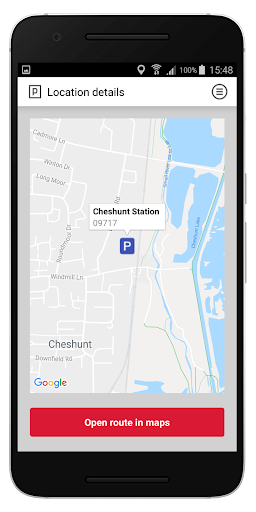
GA Parking integrates GPS navigation to help you find available parking spots and guide you to them. The app provides directions to the nearest parking facility, making it easier to park without wasting time.
Parking History and Receipts
The GA Parking app keeps track of your parking history and receipts, so you can review past transactions and manage your parking expenses. This feature is useful for frequent parkers who want to monitor their parking activity.
Remarks
Overall, GA Parking offers a comprehensive set of features to make parking simple, efficient, and hassle-free.
GA Parking App Performance
The GA Parking app is designed to offer smooth and efficient performance, ensuring that users can easily find parking spaces. The app’s performance is largely dependent on the real-time data it provides, which helps users locate available spots instantly. This ensures that you’re always up-to-date on the status of nearby parking.
Quick Access to Parking Spaces
GA Parking performs well in providing fast access to parking options. As soon as you open the app, it loads the nearest parking spaces, saving you time and reducing the frustration of searching for spots. This feature is especially useful in busy areas where parking spaces are limited.
Real-Time Availability and GPS Integration
One of the key strengths of the GA Parking app is its real-time parking availability updates. The app uses GPS technology to show you nearby parking spaces, offering a detailed view of availability. This feature enhances the app's performance by ensuring that users only see up-to-date and accurate information.
Seamless Payment System
The GA Parking app also excels in performance when it comes to payment. Users can pay for parking directly through the app, eliminating the need for cash or parking meters. The app calculates parking fees based on the time you've parked, ensuring that payments are processed quickly and accurately.
User-Friendly Experience
The app's performance is enhanced by its easy-to-use interface. With a simple and clean design, the GA Parking app allows users to navigate through its features effortlessly. Whether you're finding a parking spot, reserving it, or making a payment, the app responds quickly and efficiently, ensuring a seamless experience.
Occasional Performance Delays
While the GA Parking app generally performs well, some users have reported occasional delays, particularly in areas with limited parking availability. These delays can happen during high-demand times or in regions with fewer parking spaces. However, these instances are rare and do not significantly affect the overall performance of the app.
Remarks
The GA Parking app offers excellent performance for users looking to find and pay for parking. Its real-time updates, GPS navigation, and seamless payment system ensure that parking is quick and easy. Despite occasional delays in high-demand areas, GA Parking remains a reliable app for managing your parking needs.
GA Parking App Design & User Interface
The GA Parking app is designed to provide a simple and intuitive experience for users. It features a clean, user-friendly interface that makes parking easier. Whether you're a first-time user or a regular, the app is straightforward and easy to navigate.
Clean and Simple Layout
The GA Parking app uses a minimalistic design that avoids clutter. Each feature is clearly visible, and the layout is organized, making it easy to find parking spaces. This simple layout helps users quickly access what they need, whether it's finding a spot or making a payment.
Easy Navigation
Navigating through the app is easy and fast. With well-placed buttons and clear labels, users can move from one screen to the next without confusion. The app's interface allows users to quickly select parking locations, view payment options, and reserve spots with just a few taps.
Real-Time Updates and Map Integration
The GA Parking app features a map integration that shows real-time parking availability. This feature helps you locate nearby parking spots instantly. The app provides live updates on available spaces, helping users make quick decisions and avoid unnecessary time searching for parking.
Payment Features
GA Parking also simplifies the payment process with a smooth and secure payment system. Users can pay for parking directly in the app, and the design ensures that this process is quick and easy. With just a few taps, you can complete your transaction without any hassle.
User-Friendly Design for All
Whether you are new to parking apps or an experienced user, GA Parking’s design caters to everyone. Its user-friendly interface ensures that even people who aren’t familiar with apps can use it comfortably. The GA Parking app provides clear instructions, making it accessible to all drivers.
Remarks
The GA Parking app stands out for its clean, user-friendly design and easy-to-navigate interface. By focusing on simplicity and clarity, the app ensures a smooth parking experience for all users.
GA Parking App: Pros and Cons
The GA Parking app offers many benefits, such as ease of use, real-time parking availability, and secure payments. It allows for pre-booking parking and even extends sessions remotely.
However, some users may face challenges with limited availability in certain areas, payment fees, and the requirement of a smartphone. Below are the main pros and cons of using the app.
Pros of GA Parking App
- Easy to Use Interface
One of the biggest advantages of the GA Parking app is its user-friendly interface. It is easy to navigate, making it accessible to everyone. Whether you are tech-savvy or not, you can quickly find parking spaces and make payments without any hassle. - Real-Time Parking Availability
GA Parking helps users find available parking spots in real-time. The app uses GPS to show nearby options, ensuring that you always know where to park. This feature helps reduce the time spent looking for parking, making your experience much smoother. - Pre-Booking Parking Spaces
With GA Parking, you can reserve parking in advance. This feature ensures that you will always have a space when you arrive at your destination. It’s a great solution for crowded areas where parking is often scarce, giving you peace of mind. - Secure Payment System
The app offers secure payment options. You can pay for your parking directly through the app, avoiding the need for physical tickets or cash. Payments are calculated based on how long you park, ensuring fair and accurate charges. - Extended Parking
If you need extra time, GA Parking allows you to extend your parking session remotely. This added flexibility helps ensure that you don't have to rush back to your car, especially during busy days.
Cons of GA Parking App
- Limited Availability in Some Areas
One downside of the GA Parking app is that it may not be available in all locations. While it works well in many areas, users in certain regions may not be able to use it. This could limit its usefulness for some drivers. - Payment Fees
While the app offers a secure payment method, some users may face additional service fees. These fees can add up, especially for short-term parking sessions, which could be inconvenient for frequent users. - Requires a Smartphone
To use the GA Parking app, you need a smartphone. Drivers who don't have access to a smartphone may find it difficult to use the app, limiting its accessibility.
Remarks
Overall, GA Parking is a useful app for those looking for a more efficient way to manage parking.
GA Parking App Pricing
The GA Parking app provides flexible pricing options to ensure a smooth and cost-effective parking experience. Users can choose from different pricing plans based on location, duration, and parking space availability. The app offers a transparent payment system, so you always know how much you will pay before confirming your parking spot.
Pay-as-You-Go Pricing
GA Parking follows a pay-as-you-go model, where users pay for the exact time they park. The app automatically calculates the fee based on the duration, helping users avoid unnecessary charges. This system is ideal for those who park occasionally and prefer a simple payment method.
Hourly and Daily Parking Rates
Parking fees vary depending on the location and time of day. In high-demand areas, hourly rates may be slightly higher. Users can also choose daily parking rates, which offer better value for those who need parking for an entire day. The GA Parking app displays all pricing details before booking, making it easy to compare costs.
Monthly Subscription Plans
For frequent drivers, GA Parking offers monthly subscription plans. These plans provide unlimited access to designated parking areas for a fixed monthly fee. This option is ideal for commuters and regular visitors who want a hassle-free parking solution without paying per session.
Discounts and Promotional Offers
GA Parking occasionally provides discounts and promotional offers to help users save on parking. These may include discounts for first-time users, special rates during off-peak hours, or loyalty rewards for frequent parking sessions. Users can check the app for ongoing offers.
Secure and Convenient Payment Options
The GA Parking app allows users to pay securely through various methods, including credit cards, debit cards, and digital wallets. The seamless payment process ensures that users can park without worrying about cash or physical tickets.
Remarks
With multiple pricing options and secure payment methods, GA Parking makes parking affordable, flexible, and stress-free. Users can choose the best plan based on their needs and enjoy a smooth parking experience.
How to Download & Use GA Parking App
The GA Parking app offers a simple solution for managing your parking needs. Follow these easy steps to download and use the app.
Step 1: Download the GA Parking App
To get started, visit your phone’s app store. Search for “GA Parking” and tap on the download button. The app is free to download and is available on both Android and iOS devices. Once the download is complete, open the app to begin using it.
Step 2: Sign Up or Log In
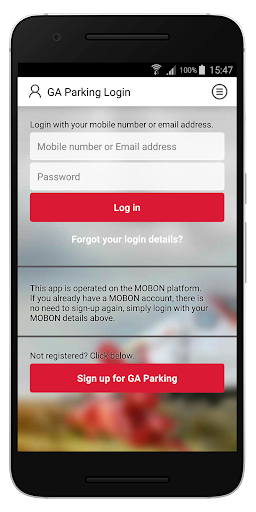
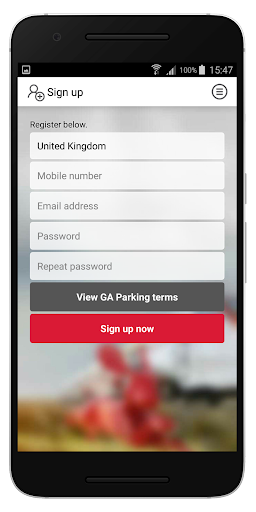
After opening the GA Parking app, you’ll need to sign up for an account if you’re a new user. If you already have an account, simply log in with your credentials. Signing up is quick, and you’ll only need to provide basic information like your email address and password.
Step 3: Find Parking
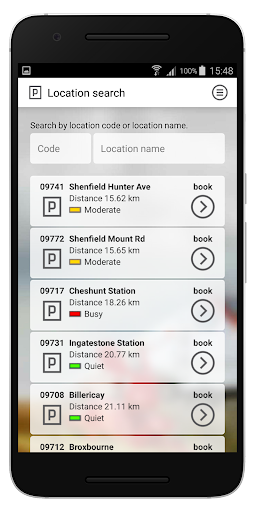
Now, you can search for parking spots nearby. The GA Parking app uses GPS to show available spaces near your location. You can also enter a specific address if you’re looking for parking in a particular area. The app displays real-time availability, helping you choose the best spot.
Step 4: Reserve Your Spot
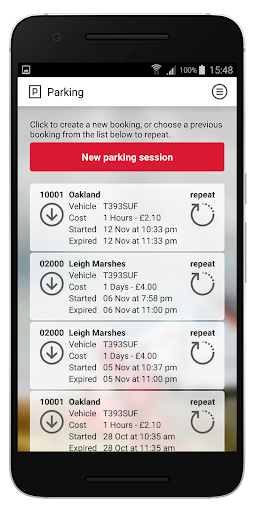
Once you find a parking space, you can reserve it in advance. Select your spot and enter the details, such as your expected arrival time. Pre-booking ensures you’ll have a space waiting for you when you arrive, avoiding any parking stress.
Step 5: Pay for Parking
After reserving your spot, you can pay directly through the GA Parking app. The app calculates the parking fee based on how long you plan to park. Payments are secure, and you can use various payment methods, including credit or debit cards.
Step 6: Extend Your Parking (If Needed)
If you need more time, GA Parking allows you to extend your parking session remotely. Simply log into the app and select the option to add more time. This feature adds flexibility, especially during busy days when you might need extra time to run errands or attend events.
Step 7: Enjoy Parking with Ease
Once your payment is processed, your parking space is reserved, and you can enjoy your day without worrying about parking. GA Parking ensures a seamless and hassle-free experience throughout the entire process.
Remarks
The GA Parking app makes finding and managing parking easier. By following these simple steps, you can use the app to save time, avoid parking stress, and ensure you always have a spot when you need one.
Some questions people ask about the GA Parking app
What is the most widely used parking app?
The most widely used parking app varies by location, but many drivers prefer apps that offer real-time availability, reservations, and secure payments. GA Parking is a popular choice because it allows users to find, book, and pay for parking easily. Its simple interface and accurate pricing make it a reliable option for daily parking needs.
What is the parking app for Atlanta, GA?
The most commonly used parking app for Atlanta, GA, is the GA Parking app. It helps drivers find, reserve, and pay for parking easily. The app provides real-time parking availability, making it simple to locate open spots. GA Parking also offers secure payment options, ensuring a hassle-free experience for both short-term and long-term parking.
Is there an app that shows free parking?
Yes, several apps help users find free parking in different locations. GA Parking is one option that provides real-time parking availability, including free spots in certain areas. The app uses GPS to guide users to nearby parking spaces, reducing the hassle of searching. With GA Parking, you can check parking rates, reserve spaces, and make payments easily. Some other apps also offer similar features, but availability may vary by city. Using an app like GA Parking saves time and helps users find cost-effective parking solutions without unnecessary stress.
How do I use my phone to pay for parking?
Using your phone to pay for parking is simple with the GA Parking app. First, download the app and create an account. Next, enter your vehicle details and payment information for a smooth transaction. Use GPS to find available parking spots nearby and select your preferred location. Once parked, choose the duration and confirm payment through the app. The GA Parking app automatically calculates the fee based on your parking time. If you need extra time, you can extend your session without returning to your car. This process makes parking easier, faster, and more convenient.
How do you use the parking app on your phone?
Using a parking app on your phone is simple and saves time. First, download and install the GA Parking app from your app store. Open the app and allow location access to find nearby parking spots. Select a location, choose the parking duration, and confirm your booking. You can make payments directly through the app using a credit card or digital wallet. If needed, you can extend your parking session without returning to your car. The GA Parking app also provides real-time availability, making it easy to find a spot quickly. It ensures a smooth and stress-free parking experience.
How to pay for parking via phone?
Paying for parking via phone is simple and convenient. First, download a reliable parking app like GA Parking on your smartphone. Then, create an account and add your payment details. Use the app’s GPS feature to find available parking spaces nearby. Select your preferred spot, choose the parking duration, and confirm payment securely through the app. Many apps also allow you to extend your parking session remotely. GA Parking ensures a hassle-free experience by providing real-time parking availability, secure transactions, and easy payment options. This method saves time, removes the need for cash, and makes parking more efficient.
How does a parking app work?
A parking app like GA Parking helps users find, reserve, and pay for parking spaces easily. It uses GPS to locate nearby parking spots and provides real-time availability. Users can book a space in advance, ensuring a hassle-free experience. The app calculates fees automatically, allowing secure payments through digital wallets or cards. GA Parking simplifies parking management.
How do you pay on your parking space app?
Paying for parking through the GA Parking app is simple and secure. First, open the app and select your parking location. Then, choose the duration of your stay and review the parking fee before proceeding. The app offers multiple payment options, including credit cards, debit cards, and digital wallets. Once you confirm the payment, your parking session starts automatically. If needed, you can extend your session through the app without returning to your car. GA Parking ensures a hassle-free experience by calculating the exact fee and providing instant payment confirmation, making parking more convenient and efficient.
Is the Park Mobile app free?
The Park Mobile app is free to download, but users must pay for parking sessions. It does not charge a monthly fee, but some locations may include a small transaction charge. GA Parking and similar apps provide flexible payment options, making it easier to find and pay for parking without using cash or meters.
How do I pay for parking on Pay by Phone?
To pay for parking using the pay-by-phone system, open the GA Parking app on your smartphone. Enter your parking zone code and the amount of time you plan to park. The app will calculate the parking fee based on the duration. After confirming, choose your payment method and complete the transaction. This system makes paying for parking quick and easy.
Is the pay-by-phone parking app free?
The GA Parking app itself is free to download and use. However, parking fees still apply based on the location and duration of your parking. The app allows you to pay easily through your phone, but you will be charged according to the parking rates in the area. While the app is free, actual parking costs depend on where you park.
What do I dial to pay for parking?
To pay for parking with the GA Parking app, you do not need to dial any number. Simply download the GA Parking app and create an account. Once you’re parked, use the app to find your parking location and choose your payment option. The app securely handles your payment directly through your phone, making parking simple and hassle-free.
Do you have to pay for parking at GSU?
Yes, you need to pay for parking at Georgia State University (GSU). Parking fees apply in most campus parking lots and garages. However, the rates may vary based on location and duration. To make the process easier, you can use the GA Parking app to find available spots, reserve them, and pay securely, all from your smartphone.
How much is parking at the ATL airport?
Parking at the ATL airport varies depending on the lot and duration. For short-term parking, the rate starts around $3 per hour. Long-term parking options, such as economy lots, are more affordable, with rates beginning at $10 per day. GA Parking can help you find and reserve parking spots at ATL airport, offering a convenient solution for travelers.
Where is the best place to park at Atlanta airport?
The best place to park at Atlanta airport depends on your needs. For short-term parking, the Terminal South and North lots are ideal as they are close to the terminals. If you’re looking for long-term parking, the Economy lots are more affordable and offer convenient shuttle service. For a more convenient experience, consider using GA Parking to reserve and pay for your spot.
You may like
Care Park App: Supercharge Your Parking Convenience!
Secure Your Parking, Secure Your Day!
The GA Parking app offers a simple and secure way to manage your parking needs. With its user-friendly interface, you can easily find and reserve parking spaces. The app ensures a stress-free experience by providing real-time availability and secure payments.
Whether you need short-term or long-term parking, GA Parking makes your day easier and more efficient. Download the app now and enjoy hassle-free parking!